Saabi Desktop one-time purchase
Accounting that lives on your computer. With an AI assistant that never leaves it.
One payment, no subscription: full double-entry accounting for macOS and Windows, with every company kept in a single file on your own computer. The assistant reads that file and answers, charts and drafts from a model that runs on your machine.
USD 200 once macOS and Windows 44 charts of accounts, every currency, 20 languages
Two ways to run Saabi. Cloud for the UAE. Desktop for anywhere.
Saabi Cloud
For UAE businesses, hosted by Saabi.
Sign in at app.saabi.ai, send invoices on WhatsApp, and keep VAT 201 and Corporate Tax current all year. Audit and filing services by qualified professionals, priced per job. Free to start, then a monthly plan.
See Saabi CloudSaabi DesktopYou are here
For anywhere in the world, on your computer.
Pay USD 200 once and download for macOS or Windows. Your books live in a file you choose, the assistant runs on a local model, and backups go to your own drive or NAS. No account, no server, no subscription.
Buy Saabi Desktop, $200- Where it runs
- CloudIn your browser and on WhatsApp
- DesktopOn your Mac or your Windows PC
- Who it is for
- CloudUAE businesses, bookkeepers and accounting firms
- DesktopBusinesses anywhere in the world
- Price
- CloudFree to start, then AED 100 per user per month
- DesktopUSD 200, once
- Sign-in
- CloudAn account at app.saabi.ai
- DesktopNone. Open the app.
- AI
- CloudSaabi AI drafts entries from WhatsApp photos and PDFs. You approve.
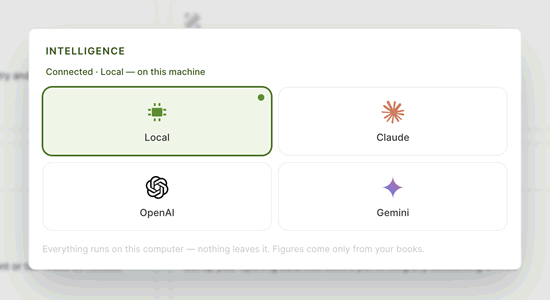
- DesktopA local model on your computer by default, or your own Claude, OpenAI or Gemini key
- Data location
- CloudSaabi's cloud, one private database per company
- DesktopOne .db file per company on your own disk
- Backups
- CloudKept by Saabi. Export any time.
- DesktopYours: on a schedule, to your drive folder or your own NAS
- Tax filing services
- CloudVAT 201 and Corporate Tax filing by qualified professionals, priced per job
- DesktopNone. It files nothing. You configure your own tax rates.
| Feature | Saabi Cloud | Saabi Desktop |
|---|---|---|
| Where it runs | In your browser and on WhatsApp | On your Mac or your Windows PC |
| Who it is for | UAE businesses, bookkeepers and accounting firms | Businesses anywhere in the world |
| Price | Free to start, then AED 100 per user per month | USD 200, once |
| Sign-in | An account at app.saabi.ai | None. Open the app. |
| AI | Saabi AI drafts entries from WhatsApp photos and PDFs. You approve. | A local model on your computer by default, or your own Claude, OpenAI or Gemini key |
| Data location | Saabi's cloud, one private database per company | One .db file per company on your own disk |
| Backups | Kept by Saabi. Export any time. | Yours: on a schedule, to your drive folder or your own NAS |
| Tax filing services | VAT 201 and Corporate Tax filing by qualified professionals, priced per job | None. It files nothing. You configure your own tax rates. |
Prefer the hosted product? See Saabi Cloud pricing.
The assistant
Ask your books a question. Get the answer, the table, the chart.
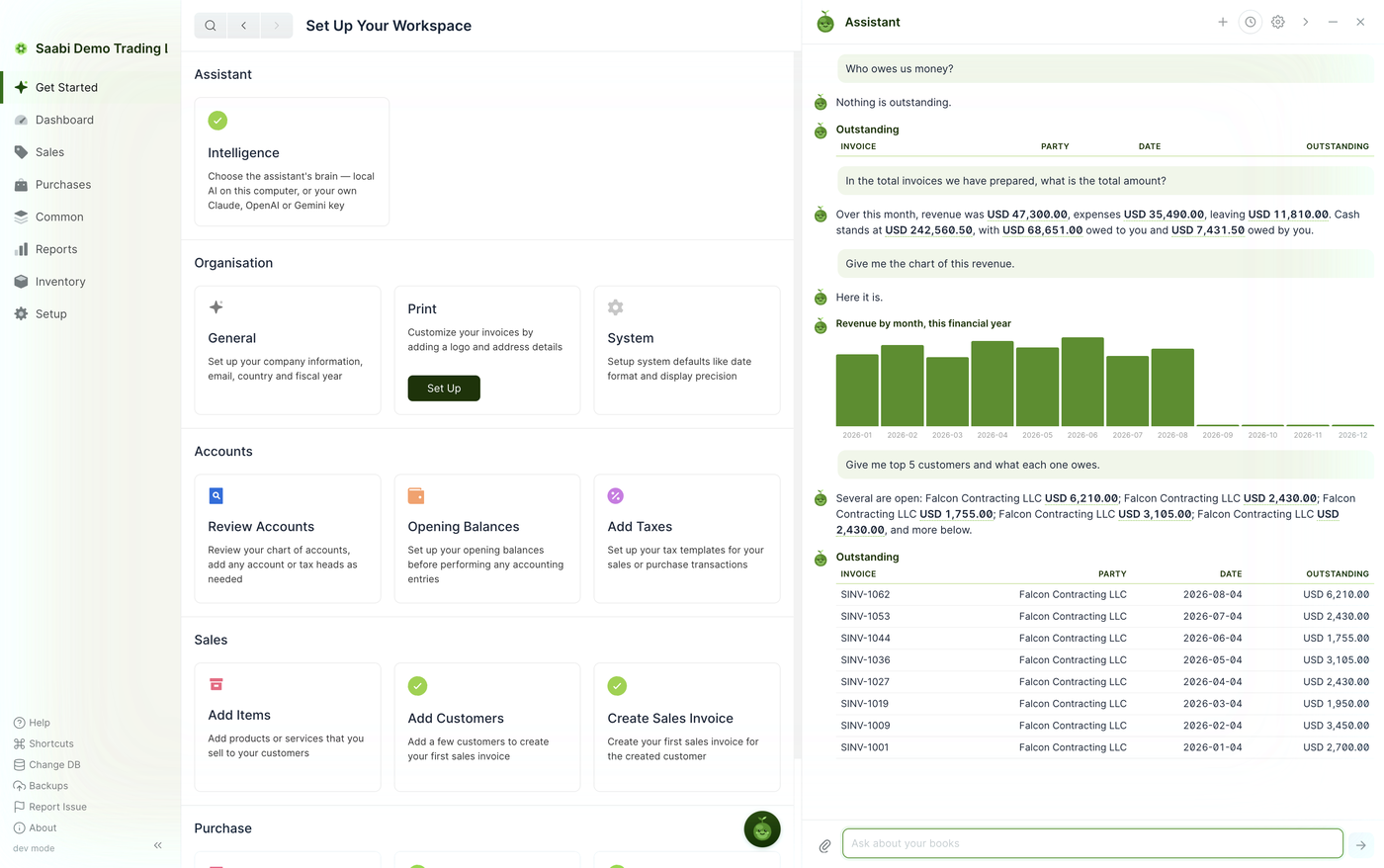
A chat panel sits beside your books. Ask in ordinary language and it reads your company file and answers with the real figures. Ask for a chart and it draws one. Ask it to invoice a customer and it prepares a draft for you to check. It does not give tax advice.
- Answers from your own ledger: who owes you, how last quarter went, what cash stands at.
- Tables and charts on request, reports run inside the conversation, a PDF when you ask for one.
- Drafts sales invoices and other entries for you to check. Nothing posts itself.
- Reads photographed or screenshotted receipts and invoices with offline OCR, and turns spreadsheets into drafts.
- Finds and opens any record you name. Conversations are kept.
- Runs on a local model by default: no internet needed, no credits, no AI subscription, nothing leaves the machine.
“I read your ledger and draft things for you to check. I never post anything myself, and I cannot give tax advice.”
Everything is switched on. One price, every module.
Browse the manualSales and POS
Quotes, invoices, payments, customers and sales items, plus leads, loyalty programmes, pricing rules, coupon codes and a till with shifts.
In the manualPurchases
Purchase invoices, supplier payments, suppliers and purchase items, with what you owe in view on every list.
In the manualInventory
Stock movements, purchase receipts and shipments, serial numbers and batches, a stock ledger and a stock balance report.
In the manualReports
General Ledger, Profit and Loss, Balance Sheet and Trial Balance. Filter by period, export the figures, print the page.
In the manualMulti-currency and taxes
Invoice in the customer's currency with exchange rates against your own, and set up your own tax templates and discounts.
In the manualImport, print templates, shortcuts
Bring spreadsheets in with the Import Wizard, design your own invoice templates, customise forms, and jump anywhere with Quick Search and the keyboard.
In the manualAlso in the box: journal entries, parties, price lists, number series, form customisation, a Create Demo company with sample data, and a dashboard with cash, receivables, payables, cashflow, profit and loss, top expenses, top customers and receivables ageing.
Your data
Your data, your disk, your backups. Kept where you choose.
- One file per companyEvery company is a single .db file on your own computer, stored wherever you choose. Nothing is sent anywhere. Several companies sit side by side, and you switch between them from the sidebar.
- Backups on a scheduleFrom every six hours to once a month, plus Back up now whenever you like. Saabi keeps the number of copies you set and discards the oldest.
- To your own drive or NASInto your iCloud Drive, Google Drive or OneDrive folder, a folder on this computer, or your own NAS or WebDAV server (Nextcloud, ownCloud and most NAS boxes), where backups upload automatically once you sign in.
- Restoring is opening a fileEach backup is a complete company file. On this computer or any other, install Saabi and open the backup with Existing Company. Your account, your folder, your keys.
Built for anywhere
Pick a country. Saabi sets the rest.
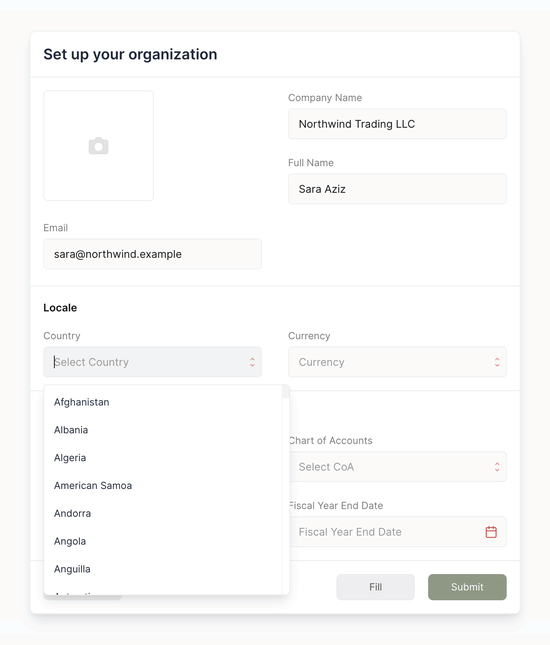
Choose your country when you create a company and Saabi sets the chart of accounts, the currency and the number and date formats. Invoice customers in their currency with exchange rates against your own, and work in the language you work in.
44
charts of accounts by country, plus a standard chart for everywhere else
250
countries and currencies on file. Keep your books in any of them.
20
interface languages, chosen before you open a company
- English
- Arabic
- Chinese (simplified)
- Chinese (traditional)
- Danish
- Dutch
- French
- German
- Gujarati
- Hindi
- Indonesian
- Korean
- Nepali
- Persian
- Portuguese
- Spanish
- Swedish
- Turkish
- Albanian
- Catalan
One payment. Then it is yours.
Saabi Desktop
$200one-time
USD, paid once. No subscription.
- macOS and Windows, Apple Silicon and Intel
- Every module switched on: sales, purchases, inventory, POS, reports
- The local AI assistant, no credits ever
- Your own cloud or NAS for backups
- Free updates for version 1
Pay once. You come straight back to the download page, and your receipt arrives by email as proof of purchase. Version 1.0.2.
Already bought? Get your downloadWhat happens after you pay
- 1PayUSD 200, once. Pay by debit or credit card at the checkout. There is no account to create and nothing to renew.
- 2Land back on the download pagePaying brings you straight back to our download page, with the macOS and Windows builds on it and your licence key beside them. Install it like any other app; there is no account to create.
- 3Create your company filePick your country and Saabi builds the chart of accounts. Or press Create Demo on the Welcome screen to explore with sample data first.
Saabi Desktop contains free software licensed under the GNU Affero General Public License v3.0 and comes with no warranty. The corresponding source is available from the Saabi team. It is not tax-compliance software: it files no returns in any jurisdiction and nothing in it is tax advice. Configure your own rates, and talk to a local accountant.
The questions everyone asks.
How do I pay?
How do I get the app after paying?
Which operating systems does it run on?
Is the app signed?
Do I need an internet connection?
Is my data uploaded anywhere?
Which AI does it use?
Can I use it outside the UAE?
How is it different from Saabi Cloud?
Can I move between computers?
Is there a manual?
What about VAT or tax filing?
One payment. The books are yours to keep. So is the assistant that reads them.
Saabi Desktop runs on macOS and Windows, keeps every company in a file you control, and answers, charts and drafts from a model on your own machine. Drafts for you to check. Nothing posts itself.
Already bought? Get your download